Posts

Editor TinyMCE in Django admin

Image
  Let stepwise Make the   download of TinyMCE Create folder structure template Configure   TEMPLATE_DIRS   in   settings.py   of your project (   example below   ) Edit the urls.py Edit admin.py Create configuration file TinyMCE  1. Download TinyMCE   you can download tinymce from http://www.tinymce.com/download/download.php 2.   Structure The folder structure is something like: project app templates css js tinymce     Place the folder inside tinymce   project> templates> js   , as shown above. 3.   TEMPLATE_DIRS (settings.py) Edit the   settings.py   and edit / add these lines: import the . path   TEMPLATE_DIRS = ( the . path . join ( the . path . dirname ( __file__ ) , 'templates' ) , ) 4.   Serving static files Open the file   urls.py   (the project root) and add the line 3 as below: ...
Django Dynamic Formsets with Jquery

If you have an existing project, it's quite easy to add client-side support for adding and removing forms. I'll assume you've already created your formset. You can create formsets using any of the provided methods: both regular formsets (created with the ``formset_factory``) and inline formsets (created with the ``inlineformset_factory``) are supported. 1. First, copy ``jquery.formset.js`` to your ``MEDIA_ROOT``; don't    forget to include the jQuery library too! 2. Include a reference to the script in your template; again, remember    to reference the jQuery library, before including the script. 3. Render the formset as you would normally -- I usually use a table    but you can use DIVs, Ps or whatever you desire. Let's use the    example markup below:: <form id="myForm" method="post" action="">            <table border="0" cellpadding="0" cellspacing="0">  ...

Coffee Script : Overview

Image
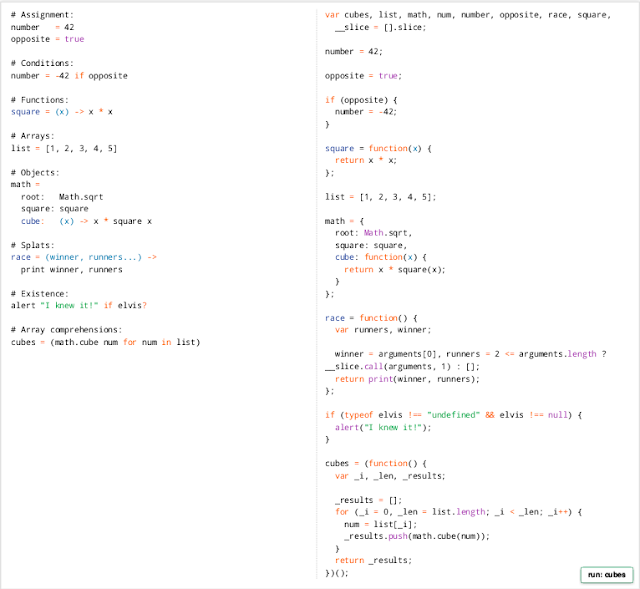
     CoffeeScript is a little language that compiles into JavaScript . Underneath that awkward Java-esque patina, JavaScript has always had a gorgeous heart. CoffeeScript is an attempt to expose the good parts of JavaScript in a simple way.     The golden rule of CoffeeScript is: "It's just JavaScript". The code compiles one-to-one into the equivalent JS, and there is no interpretation at runtime. You can use any existing JavaScript library seamlessly from CoffeeScript (and vice-versa). The compiled output is readable and pretty-printed, passes through JavaScript Lint without warnings, will work in every JavaScript runtime, and tends to run as fast or faster than the equivalent handwritten JavaScript.   Latest Version: 1.6.2                sudo npm install -g coffee-script Overview CoffeeScript on the left, compiled JavaScript output on the right.   Installation...

Python Tutorial 8 : Python Utilities

In this section, we look at a few of Python's many standard utility modules to solve common problems. File System -- os, os.path, shutil The *os* and *os.path* modules include many functions to interact with the file system. The *shutil* module can copy files. os module docs filenames = os.listdir(dir) -- list of filenames in that directory path (not including . and ..). The filenames are just the names in the directory, not their absolute paths. os.path.join(dir, filename) -- given a filename from the above list, use this to put the dir and filename together to make a path os.path.abspath(path) -- given a path, return an absolute form, e.g. /home/nick/foo/bar.html os.path.dirname(path), os.path.basename(path) -- given dir/foo/bar.html, return the dirname "dir/foo" and basename "bar.html" os.path.exists(path) -- true if it exists os.mkdir(dir_path) -- makes one dir, os.makedirs(dir_path) makes all the needed ...